Property Manager Reports a Burst Pipe

Fault Report

Know the job before you roll a truck.

Hermia Qualifies Every Enquiry — Automatically

Right questions. Real answers. No phone calls.

Watch A Real Enquiry Get Qualified

S
Sarah Nguyen
Property Manager

Job Created in Simpro

Simpro
Customer Details
NameSarah Nguyen
Address42 Bourke Street, Melbourne
Phone+61 494 719 401
Estimate$350 — $600
UrgencyEmergency
Aug
18
Technician Assigned · Today 2pm
Burst Pipe — Kitchen Sink
42 Bourke Street, Melbourne

Hermia

Know The Job First

Simpro Partner Simpro Partner
Scroll
Built For Plumbing Contractors

It was never about getting leads.
It's about knowing the job before you go to site.

Hermia is built specifically for plumbing contractors — businesses across Australia, Canada, New Zealand, the UK, Ireland and the United States running Simpro or AroFlo, drowning in high volumes of enquiries that all need qualifying before anyone can act.

Every enquiry is run through your question set — what's wrong, where it is, how bad it is, and since when — with photos and video to back it up. Vague answers get pushed back on until they're specific enough to act on, so tire kickers filter themselves out before they ever reach you.

By the time you see the job, you already have the full picture — not a guess you make after rolling a truck. And it's not just sitting in an inbox: it's already booked in your CRM, against a real technician's real availability, before your office has even picked up the phone.

And Hermia becomes an additional lead channel of its own. Once a lead has been through qualification, Hermia remembers them permanently — so the next time that same customer needs help, they don't message a competitor or run a Google search. They message Hermia, go through the same fast qualification, and the job lands back in your CRM. The lead stays completely yours.

How It Works

Not a chatbot. A full intake system.

Here's exactly what happens — and exactly how — between an enquiry landing and a booked job appearing on your calendar.

01 — Intake

Every enquiry read the moment it lands.

Gmail and Outlook are monitored around the clock. Direct emails, forwarded messages from property managers and agents, leads buried inside platform emails — Hermia reads each one, works out whether it's a genuine plumbing enquiry, and finds the actual person who needs help, even when the email came from a business on their behalf.

The filter is trade-specific — it's trained to recognise what a genuine plumbing enquiry actually looks like, not just scan for keywords. Invoices, alerts, marketing and newsletters are filtered out; so are enquiries that are clearly for a different trade entirely. Real leads never slip through. Attachments are opened and read, not just noted — a PDF work order from a property manager, a photo of a leaking pipe, a scanned job sheet: Hermia extracts the address, the issue, and any reference numbers straight out of the file, so nothing sits unread in an inbox waiting for someone to open it.

The lead receives a clean, branded email within moments — introduced as your digital assistant, under your name — with a unique Customer ID and one-tap buttons to continue on WhatsApp, pre-sorted by urgency.

What the lead sees
1Enquiry sent at 9:41pm — office closed
29:42pm: branded reply arrives from "your office" with their Customer ID
3They tap one button: needs attention today / within 2–3 days / planning ahead
4WhatsApp opens, already knowing who they are — qualification begins
02 — Qualification

Your trade's questions. Genuinely answered.

On WhatsApp — Hermia's own Meta-verified business number — the lead goes through a step-by-step qualification built for plumbing work: what's leaking, blocked or not working, where it is, whether water is actively running, whether it's been shut off at the mains or the fixture, since when, and what's already been tried.

If an answer is too vague to act on, Hermia doesn't shrug and move on. "The tap's broken" gets a reply naming exactly what's missing — and when the lead answers, it's merged with what they already said, so nobody repeats themselves. Nonsense and spam are filtered without a human ever seeing them. That same filter is what removes tire kickers: the unserious drop off at the first real question; the serious finish in minutes.

Active flooding, a gas smell, or no hot water at all escalates instantly. Urgency keywords cut through every queue — even a conversation Hermia had already wrapped up reopens itself the moment a customer comes back with a word like "emergency" or "urgent", so a genuine crisis is never left waiting behind a closed thread.

Handled in the conversation
  • Messy typing, slang & Australian shorthand — understood, cleaned, and written up professionally
  • Voice notes — transcribed and treated like typed answers
  • Photo & video bursts — ten photos and a clip? Collected as one batch, stored permanently, delivered as a single branded gallery link on the job. What's said in videos is transcribed into the notes
  • Follow-ups merged — partial answers are remembered; the lead only supplies what's missing
  • Pre-approved templates only — every message Hermia sends is on-script; nothing is freeform AI
03 — Real Scheduling (Simpro)

Booked against your actual calendar — not "we'll call you back."

This is where Hermia goes further than any intake bot. With Simpro, when the lead names their availability — "Tuesday morning" — Hermia pulls your actual staff list and your actual schedule from your CRM, scans the next 20 days, and works out which of your technicians is genuinely free at the time the customer asked for. Then it books the closest available match.

Every "today" and "tomorrow" Hermia works out is resolved in your technician's own timezone, not a generic default — so if you run crews across more than one state, a customer in Perth booking "tomorrow morning" is never accidentally scheduled against Sydney's clock.

The job is created, the technician is assigned, and the appointment lands on your CRM calendar as a real scheduled activity — exactly as if your best office admin had checked the whiteboard and pencilled it in. Your customer gets a confirmed time and the technician's name before the conversation ends. Your tech gets a booked job. Nobody plays phone tag. Simply put: with Simpro, we book the lead for you.

And the confirmation does more than name the tech. Your customer walks away with a direct line to the technician handling their job — sent automatically the moment it's booked, so they can reach the person actually turning up rather than chasing an office. If that technician has no mobile on file, it falls back to your business line, so a customer is never left without a way to reach you.

One setup note: Hermia reads that number straight from your technician's record in Simpro, so your staff's phone numbers need to be entered there — a mobile, or a work number at minimum. If a technician's number is missing, Hermia uses the business contact you provide at onboarding; if there's no number available anywhere, that technician simply can't be reached automatically.

The booking, step by step
1Lead: "Tuesday morning works"
2Hermia pulls your staff list & live schedule from Simpro
3Scans up to 20 days ahead for a genuinely free technician, in your local timezone
4Books the closest match as a real calendar activity, tech assigned
5Lead is told which technician is coming, and when — in the chat
6Customer is handed a direct number for that technician — automatically, with your business line as backup
04 — Pricing

A real estimate — from your rates, not a guess.

During onboarding, you set your pricing criteria — what a defect rectification, an inspection, or a callout roughly costs at your rates. When a qualified lead describes their situation, Hermia matches it against your tiers and gives them a real figure before the job is booked. The "how much roughly?" conversation happens without touching your office — and price shoppers reveal themselves before costing you a cent of admin.

If they accept: the agreed figure is logged on the job record — no confusion when the job hits your schedule. If they negotiate: they're handed straight to the negotiation contact you chose at onboarding, and you're told they're reaching out about pricing before they contact you. The job lands in your CRM either way.
Zero duplicates — how the matching works
AExisting customer, existing site → both reused, only the job is added
BExisting customer, new address → only the site is created; customer ID reused
CCompletely new → customer and site created once, correctly, fully populated

Before anything is created, Hermia searches your CRM for the customer and the site. The duplicate-customer mess that plagues Simpro and AroFlo databases simply stops happening. See "How Hermia keeps your CRM clean" below for the full picture.

05 — Hermia Lead Generator

Once they're yours, they stay yours.

Every lead keeps their Customer ID forever. The moment someone's been through qualification once, Hermia remembers exactly who they are — which of your customers they belong to, and what they needed last time. No re-qualifying, no re-typing, no duplicate record.

Picture this: six months after her hot water system was fixed, Jessica's kitchen tap starts leaking. She doesn't run a Google search. She doesn't message a competitor. She messages Hermia — the same number, the same assistant she trusted last time. Hermia recognises her instantly, pulls up her history, and within minutes sends the job straight back to you: "Jessica's lead is back." No admin, no chasing, no lost opportunity. That's Hermia acting as your own lead generator — quietly working in the background to keep every past customer coming back to you, and only you.

That's why Hermia isn't just an intake tool — it's an additional channel of leads that gets stronger every month it runs. Repeat business and referrals flow in with zero admin, and the lead stays completely yours: they talk to your assistant, under your name. Hermia stays invisible.

What lands on the job card
  • Problem, exact location & severity — written like your team wrote it
  • History: when it started, what's been tried, whether it's recurring
  • Photo & video gallery link + transcribed voice notes
  • Site access instructions, keys, on-site contact
  • Billing entity confirmed before booking
  • Agreed estimate, booked slot, assigned technician, priority
  • All mapped into the custom fields your build already uses — your naming conventions, untouched
06 — Always On Guard

A finished conversation still listens for "emergency."

Once a lead's fully qualified, Hermia closes out that conversation so a customer isn't pestered with follow-up messages for no reason. But that closed thread isn't dead — it's just quiet. The instant that same customer messages back with a word like emergency, urgent, or critical, Hermia reopens the conversation automatically and picks qualification straight back up, no waiting on a human to notice and manually reopen it.

It's a small thing that matters at 2am: a tenant who mentioned a slow drain last week and is now standing in a flooded bathroom doesn't need to find your number again or start from scratch. They just message the same chat, and Hermia is straight back on it.

Why this matters
  • No lead ever sits behind a closed door — genuine emergencies always get through
  • No manual reopening — nobody on your team has to catch it and flip a switch
  • Works at any hour — part of what keeps Hermia running 24/7 without a gap
How It Works

How Hermia qualifies your plumbing leads.

Most "AI chatbots" just answer questions. Hermia does something different: it runs every enquiry through a structured qualification process before it ever reaches your phone, so what lands in your inbox is a real, bookable job — not a half-finished conversation.

The moment someone messages you on WhatsApp about a plumbing issue, Hermia takes over the back-and-forth and works through a purpose-built set of questions designed specifically for plumbing jobs — not a generic template borrowed from another trade. Here's what it actually asks, and why each question matters.

The Problem Itself

What's actually wrong — a leak, a blockage, no hot water, a burst pipe. Hermia reads the reply in plain English, however messy or informal, and turns it into a clear, professional job description your team can act on immediately.

What's Affected

Which fixture or system needs attention — hot water unit, toilet, tap, drain, pipe, or sewer line. If the customer mentions a brand or model, Hermia captures that too, so you know what you're walking into before you arrive.

The Site Address

Captured and checked against your actual service area — suburb, state and country — and confirmed back with the customer before anything proceeds. If what they typed actually resolves to the wrong state or the wrong country entirely, Hermia catches that too, not just a wrong suburb, so a job never quietly lands somewhere your team can't reach.

Preferred Timing

When the customer wants the job done, resolved into an exact day and time in your technician's own timezone — not a vague "sometime this week."

Site Access

Whether someone will be home, whether the property is locked or restricted, and whether your plumber will need a key, code, or site induction to get in.

Hazards

Anything your plumber should know before attending — pets, restricted areas, confined spaces, mould, or structural damage. If there's nothing to report, Hermia confirms that too, so your technician isn't left guessing.

Water or Gas Isolation

Whether the supply is already off, or whether your plumber will need to shut it off on arrival, and where the shut-off point is if the customer knows.

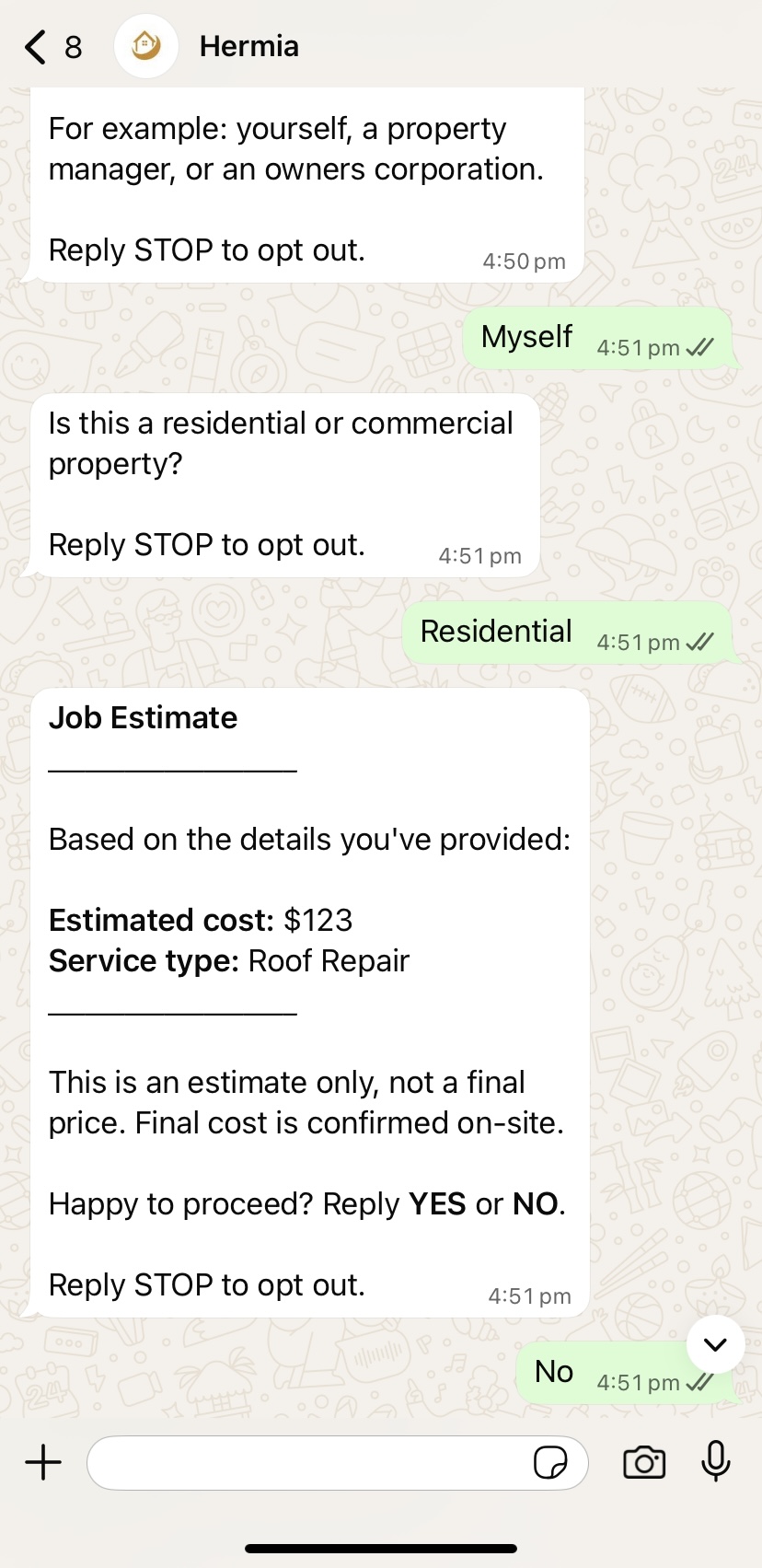
Residential or Commercial

Because the two often mean different pricing, different access requirements, and different jobs entirely.

Billing Contact

Who's responsible for payment — the customer themselves, a property manager, an owners corporation, or a managing agent.

A Price Estimate

Based on your own pricing structure, Hermia gives the customer a clear estimate before booking and confirms they're happy to proceed. If they push back on price, Hermia hands them straight to your contact details rather than guessing at a negotiation.

Why this matters for you

Every one of these questions exists for one reason: so that by the time a job lands in front of you, you already know what the problem is, where it is, who's paying, whether you can get in, what to bring, and what it's roughly going to cost. No back-and-forth. No arriving to find out the water was never turned off, or the customer wasn't told about the callout fee, or the address was never confirmed.

If a customer's answer is unclear, vague, or doesn't actually answer what was asked, Hermia doesn't guess. It asks again, in plain language, until it has something your team can genuinely act on. Nothing gets passed through half-finished.

It's not a chatbot

Hermia isn't a script that repeats itself or a generic FAQ bot bolted onto WhatsApp. It's a purpose-built qualification system, tuned specifically for how plumbing jobs actually work, built to filter out spam and time-wasters, and designed to hand your team a complete, ready-to-book job every time.

Inside Your CRM — Simpro

Exactly what lands in Simpro — and how it gets there.

It starts with nothing more than an email and a photo. The moment a lead's first message and images come in, Hermia is already writing the record — fully synced to your live Simpro account, no CSV, no manual entry, no copy-paste. By the time you open the job, the Customer and the Lead are already built, in your naming conventions, in your custom fields.

With Simpro, Hermia runs the same full WhatsApp qualification as AroFlo — and then books the lead for you. The moment a customer names a day that works, Hermia checks who on your team is actually free — using your live staff list and schedule — and locks in the closest available technician as a real, booked calendar activity. No back-and-forth, no double-checking, no manual entry.

And it all lands inside your CRM — the customer's contact details, the job's urgency, and the photos they sent are written straight onto the record. The full set of qualification answers lives in your Open Leads, ready for whoever's dispatching — not sitting in a separate inbox waiting to be re-keyed.

Customer Module

Who they are — identity and matching.

First name and last name are captured from the very first message, so the customer is greeted properly and matched correctly against your existing records — phone and email are both stored as matching keys, so a returning customer is recognised even if they use a different email or number the second time.

The Customer record stays clean and identity-only — everything about this specific job, including urgency, pricing and billing, is written to the Lead instead, so a customer with five jobs over the years never has old urgency or estimate data overwritten by a new one.

Customer fields
  • First Name / Last Name — identity & matching
  • Phone — matching key
  • Email — second matching key
Lead & Job Module

What's wrong, how urgent, and what it costs.

Contact phone and email travel with the job as well as the customer, so whoever's dispatching never has to jump back to the customer card. Asset Type tells the technician what they're dealing with before they leave the office — a hot water system, a pipe, a fixture, an appliance — so the right tools and parts go on the truck.

UrgencyEmergency, Urgent, or Standard — and Estimate Amount are both written to the Lead, per job, so you can triage at a glance and see exactly what was quoted or agreed without it being overwritten by whatever the customer's next job turns out to be. Billing Entity confirms who's accountable for that specific job's invoice. Fault Code is a standardised code for the specific fault type, written to its own field so faults can be tracked and reported on across your whole customer base over time. Defect Status records where the issue currently sits — active, intermittent, or resolved pending confirmation.

Lead / Job fields
  • Contact Phone / Email — travels with the job
  • Urgency — Emergency / Urgent / Standard
  • Estimate Amount — quoted or agreed price
  • Billing Entity — who's accountable for this job's invoice
  • Asset Type — hot water system, pipe, fixture, or appliance
  • Fault Code — standardised fault classification
  • Defect Status — active / intermittent / resolved-pending
  • Confirmation Date — customer's stated availability, drives booking
Safety & Site Access

Isolations, hazards and how to get in.

Isolations is its own safety question, asked directly to the lead — it captures whether the water has been isolated at the mains or at the fixture before a technician can safely start work, and whether any gas or electrical isolation is also needed for the job. That's the difference between a plumber knowing the mains are already shut off versus discovering an active leak on arrival. It's stored as its own field, separate from general notes, so it shows as a distinct checklist item — never buried in a paragraph.

Hazards covers anything else on site — a dog on the property, restricted areas, awkward access under a house or in a roof cavity — kept distinct from isolations rather than folded into general safety notes. Access Notes covers gate codes, locked rooms, and who to call on arrival, so a technician is never standing at a locked gate with no way in.

Safety fields
  • Isolations — water/gas/power needing shutoff before work starts
  • Hazards — other on-site risks, flagged separately
  • Safety Notes — general site conditions
  • Access Notes — gate codes, keys, on-site contact
Site Address

Typed loosely. Stored Simpro-clean.

Whatever the lead types — "the place on Collins Street, Melbourne" — is parsed and written into Simpro exactly the way Simpro needs it: street address, suburb, state and postcode as their own fields, feeding a properly structured Site record rather than one messy line of text.

Photos and videos the lead sends are attached to the same job as a permanent gallery link, so a technician can see the fault before they've even left the office — not just read a description of it.

Site fields
  • Street Address
  • Suburb
  • State
  • Postcode
  • Photos & Videos — gallery link, synced to the job
Inside Your CRM — AroFlo

Exactly what lands in AroFlo — and how it gets there.

AroFlo runs the exact same WhatsApp qualification as Simpro — every enquiry put through the full question set before it reaches you. The one difference is scheduling: on AroFlo, Hermia doesn't book against your calendar. Instead it fills in your AroFlo client and location records automatically, then sends a WhatsApp alert the moment a lead finishes qualifying, telling you exactly how hot the lead is before you even open the app.

Client Section

Contact details, filled in for you.

The moment a lead qualifies, Hermia writes their details straight into your AroFlo Client/Supplier record — name, address, suburb, state and postcode, plus a primary contact with phone, mobile and email. There's no retyping from a WhatsApp thread into a form, and no copy-paste between the two.

Matching works the same way it does in Simpro: phone and email are used to recognise a returning customer, so Hermia never creates a second Client record for someone already on file.

Client / Supplier fields
  • Client / Supplier Name
  • Address, Suburb, State, Postcode
  • Primary Contact
  • Phone, Mobile, Fax, Email
Location Section

The job site, mapped straight in.

Alongside the Client record, Hermia writes the job site into your AroFlo Location model — linked to the right Client/Supplier, with suburb, state, postcode, an on-site contact, phone and email all filled in. Your team opens the job already knowing exactly where they're going and who to call when they arrive.

Location fields
  • Client / Supplier — linked record
  • Location, Suburb, State, Postcode
  • Contact, Phone, Email
  • Building Type — residential or commercial
  • Access Notes — keys, codes, on-site contact
How AroFlo Differs From Simpro

Same qualification. Minus the scheduling.

Every enquiry gets Hermia's full WhatsApp qualification on AroFlo, exactly as it does on Simpro — same questions, same filtering, same warm and hot leads. The only thing AroFlo can't do is scheduling: it doesn't currently support the live calendar integration Simpro does, so Hermia doesn't book a technician or touch your calendar. You get the fully qualified lead and decide when to book it in yourself.

The answers from qualification don't get written into AroFlo's own fields the way they do in Simpro — instead, the full set of answers is delivered straight to you as a WhatsApp message, alongside the client and location records already filled in.

Put simply: both run the same qualification. With Simpro, the qualified lead lands inside your CRM and is booked onto your calendar. With AroFlo, we hand you the same warm and hot leads directly — client and site details filled in, qualification in your pocket — and the one thing missing is the automatic booking.

What you get instead of a booking
  • A "New Qualification" WhatsApp message the moment a lead finishes
  • An instant Hot or Warm rating on every single lead
  • A link to the full lead detail — asset type, access notes, defect status, hazards
  • Cold enquiries are filtered out before they reach your phone — see the guarantee below
The Hermia Guarantee

Qualified enquiries only. Not inbox noise.

This is the part contractors don't believe until they see it: whether you're on Simpro or AroFlo, cold enquiries don't reach your team. Every enquiry runs through Hermia's full WhatsApp qualification — the same structured process every time, with no shortcuts — before you ever hear about it.

A cold enquiry is removed when a customer doesn't complete the qualification process, can't provide enough information about the job, doesn't confirm a genuine plumbing issue, or shows no intention of proceeding. Hermia filters these out before they reach your WhatsApp.

The only enquiries your team receives are warm leads — customers who've confirmed a genuine issue, provided job details, and want to discuss the next step or pricing — and hot leads, who've completed qualification, accepted the estimated service range, and are ready to move forward. When an enquiry reaches your WhatsApp, it has already passed Hermia's qualification process.

Hermia's guarantee: your team receives qualified enquiries — not unfiltered inbox noise.

The alert tells you the rating — Hot or Warm — and one tap opens the full job docket. This is exactly what your team sees — every field Hermia captured, in one place, before anyone rolls a truck.

Hermia · Job Docket · Sample
● Emergency
Sample Client
42 Bourke Street, Melbourne VIC 3000
Confirmed availability: Today, 2:00pm — 4:00pm
Building Type
Commercial
Asset Type
Kitchen Pipe
Billing Entity
Manager
Fault Code
PL-204
Defect Status
Active
Isolation
Shut off under sink
Estimate Amount
Negotiating
Phone
Hazards
None reported
Fault Description
Kitchen pipe burst under the sink, water running for around 20 minutes before mains were isolated
Access Notes
Access will be given via keys — site manager on-site from 1:30pm
Photos & Videos · tap to open
Every photo the customer sent — and any videos, with what's said in them transcribed into the notes.
Not stored · view only
Behind The Scenes

How Hermia keeps your CRM clean, every time.

Before Hermia creates anything, it checks what you already have — matching every lead against your existing customers and sites by phone and email, so nothing is ever duplicated. Every lead falls into one of three tiers.

Tier 1 — Match Found

The lead matches an existing customer at a site you already have on file. Hermia doesn't touch the customer or site record at all — it simply adds the new job with everything the lead just told it.

Tier 2 — New Site

The customer's on file, but this is a new address. Hermia leaves the customer record exactly as it is and creates only the new site — called "Creating Your Site" in AroFlo, or "Creating New Location" in Simpro — so your existing customer history is never touched.

Tier 3 — Brand New

No match at all. Hermia creates a brand-new customer record and a brand-new site together, fully populated from the qualification — so the very first job for a new customer is ready to go, start to finish.

In Simpro, every answer from the qualification writes straight into your CRM's own fields. In AroFlo, the client and location details are filled in automatically, and the full qualification — every answer, every detail — is delivered to you as a WhatsApp message instead.

Response Speed

Fast enough to win the job.
Not so fast it feels like a machine.

Property managers blast the same job to five contractors at once. The first clear, complete response wins it — so Hermia answers while the others are still listening to voicemail. Here's exactly how fast, at every stage.

~60sec
First reply to a brand-new enquiry — day or night. An email that lands at 9:41pm gets a branded reply before 9:42pm, not the next business morning.
Once the WhatsApp conversation is underway — reply time per question
Confirming a detailname, urgency pick, a simple yes/no
0.4 sec
Hazards & water/gas isolationwhether it's safe, what's already shut off
1.2 sec
Site address & availabilityverified against your service area before it's accepted
1.5 sec
Describing the fault or access notesenough time to finish a full sentence, not just the first line
1.8 sec
Photos & video burstsa whole batch collected into one gallery, not split apart
4.8 sec

Every one of these windows is deliberate, not a delay. A customer typing "it's the kitchen tap", then "under the sink", then "since this morning" as three separate messages gets read as one answer, not three interruptions. Six photos and a video get collected as one gallery link, not scattered across the conversation. Replying before the window closes would mean replying before your customer had actually finished talking — so the wait is exactly as long as it needs to be, and no longer.

Under The Hood

Engineered like infrastructure.
Not a chatbot with a plumbing prompt.

The difference between Hermia and a generic AI assistant isn't how well it writes. It's what it's allowed to decide.

The decision layer

Every answer is judged by our system — not by the AI.

Before a single word is written back to your customer, their answer is run through a fixed set of checks built for that exact question. Does the address have a street number and a suburb. Does "pipe" say which pipe. Does the fault description actually describe a fault a plumber can act on.

Those checks are code. They run identically every single time, on every contractor's account, at two in the morning under load, on the ten thousandth job as on the first. The same answer always gets the same verdict. The AI's only job is to turn that verdict into a warm, human sentence — it never gets to overrule it, and it never decides whether a lead passes.

That matters because AI is excellent at writing and unreliable at judging. So we only let it do the first one.

What this means for you
  • No invented prices. The figure your customer is quoted is matched against your own rate card by code — once — and the identical number appears on your job docket. It cannot drift between the message and the record
  • No accidental rejections. A good answer can't be bounced back to your customer because the AI was having an off moment
  • No made-up details. Nothing is inferred, guessed, or filled in on the customer's behalf. If it wasn't said, it isn't on the job
  • Nothing half-finished gets through. Vague answers are pushed back on with the specific options spelled out — "is it the kitchen pipe, the hot water system, or the main?" — so the customer can just pick one
  • When it can't be certain, it doesn't guess. An unmatched price or an unclear job is flagged for a human rather than being quietly invented
  • Every closed conversation still listens for one thing. A follow-up mentioning emergency, urgent, or critical reopens it automatically, so nothing genuinely urgent is ever stuck waiting
Response Times

Three tiers. Easy to remember.

Every job Hermia qualifies is sorted into one of three response tiers, so you always know how fast a job needs to move — at a glance, without reading the whole brief.

Emergency
Today
Active leaks, flooding, gas smells, or no water at all — anything unsafe or actively getting worse.
Urgent
2–4 Days
A real problem that needs fixing soon, but isn't actively damaging the property right now.
Standard
Next Week
Planned work, routine maintenance, and non-urgent repairs.
The Difference
The most prepared contractor
wins the job.

Property managers and facilities teams blast the same request to five or six companies at once. The one who responds first with a clear scope, verified details and a professional brief wins — not the cheapest.

Without Hermia
Vague enquiries — no address, no access info, no idea who's paying
Days of phone tag and email back-and-forth to scope one job
Blind dispatches — wrong parts, wasted visits, dead margins
Emergencies buried behind minor maintenance emails
Same customer typed in three times at a site that already exists
After-hours leads lost to whoever answered first
With Hermia
Complete brief from the first message — scope, site, urgency, billing entity
Zero phone calls — the right questions answered in-conversation
You get the information before you go on a job — photos, video and full context, every time
Emergency / urgent / standard triaged instantly
Zero duplicates + technician booked on your live calendar
24/7 — jobs sit booked and briefed in your CRM by sunrise
Every Monday

Your week, in one screen.

Not a dashboard you have to learn — a short, plain-English review that lands every Monday and answers the only two questions that matter: are you winning, and who do you need to chase? Built from real qualified-job data, so it reads like a to-do list with dollar signs, not vanity metrics.

The number that pays for itself

The money still on the table.

Hermia knows which leads accepted your price and which are still negotiating — so your review surfaces the jobs about to walk: “$4,200 sitting in negotiation this week — here are the customers and their numbers.” That's revenue you can go re-close today, not a figure you glance at and forget.

It also proves the thing you can't see day to day: how fast you answered. When you reply to every enquiry in seconds and the other five contractors take hours, that's why you're winning the work — and your review puts a number on it.

This week at a glance
15 leads → 11 qualified
$6,800 agreed · $4,200 in negotiation
9 emergencies, 4 urgent, 2 standard
Average in-chat reply: under 2 seconds
3 repeat customers Hermia brought back to you

Illustrative figures. Your review is built from your own qualified jobs — agreed value, pipeline in negotiation, urgency mix, response time and repeat business.

Pricing

One trade. Two CRMs.
Ready on day one.

A complete qualification system — every question, safety check, follow-up and booking flow already built and tested for plumbing work. Every plan starts with a 7-day free trial before your monthly fee is charged.

Simpro
Contractors
Full Booking & Scheduling · AU · CA · NZ · UK · IE · US
7-Day Free Trial
$1,700 AUD / month First charge after your 7-day free trial $1,800 AUD one-off Implementation & connection feeRefundable within 48 hours of setup if you're not happy — no questions asked
Simpro · Live
What Hermia does for your Simpro business
  • We book the lead for you — your live staff list & schedule checked, closest free technician assigned, real calendar activity created
  • Direct line to the assigned tech — your customer gets the technician's name and a number to reach them, right in the booking confirmation
  • Full qualification, on your terms — asset, urgency, defect status & site details captured from the first message
  • Site access sorted before dispatch — keys, gate codes, access constraints & on-site contact asked upfront
  • Billing entity locked in — who's accountable for the bill, confirmed before the job is booked
  • Photo & video evidence — leaks, blockages & site conditions collected into one gallery on the job
  • Zero-duplicate matching — customers & sites searched before anything is created
  • Emergency / Urgent / Standard triage — every job sorted by response time on arrival, and an emergency reopens a closed chat automatically
  • Hermia Lead Generator — returning customers recognised instantly; repeat work flows in with zero admin
  • Your Simpro custom fields mapped — your naming, untouched
  • Weekly Business Review — agreed value, jobs in negotiation, urgency mix, response time & repeat customers, every Monday
AroFlo
Contractors
Qualified Warm & Hot Leads · AU · CA · NZ · UK · IE · US
7-Day Free Trial
$1,700 AUD / month First charge after your 7-day free trial $900 AUD one-off Implementation & connection feeRefundable within 48 hours of setup if you're not happy — no questions asked
AroFlo · Live (No Scheduling)
What Hermia does for your AroFlo business
  • Qualified warm or hot leads only — cold enquiries and tyre kickers are filtered out before they reach you
  • Instant WhatsApp alert — a "New Qualification" message with a Hot/Warm rating the moment a lead finishes
  • Client & Location auto-fill — name, address, contact, phone & email written into AroFlo automatically
  • Full lead detail on tap — asset type, access notes, defect status & hazards, one link away
  • Photo & video evidence — leaks, blockages & site conditions collected into one gallery on the job
  • Zero-duplicate matching — clients & locations searched before anything is created
  • Emergency / Urgent / Standard triage — every job sorted by response time on arrival, and an emergency reopens a closed chat automatically
  • Hermia Lead Generator — returning customers recognised instantly; repeat work flows in with zero admin
  • Weekly Business Review — agreed value, jobs in negotiation, urgency mix, response time & repeat customers, every Monday

Every plan runs on pre-approved, on-script templates only — your leads never see freeform AI output. Setup fees ($1,800 for Simpro, $900 for AroFlo) are fully refundable within 48 hours if you're not satisfied. Want to change what's asked? Email us — question set updates are live within 1–3 business days, no new onboarding call.

Refunds

A clear, no-questions-asked window.

Every plan includes a 7-day free trial before your monthly fee is ever charged, so you can see Hermia running on real enquiries before paying anything.

If, after paying your one-off implementation & connection fee, you decide Hermia isn't right for your business, tell us within 48 hours of setup and we'll refund the full setup fee — no questions asked.

After that 48-hour window has passed, the setup fee is no longer refundable, as onboarding work on your account is already complete.

Simpro Setup Fee
$1,800 AUD
AroFlo Setup Fee
$900 AUD
Refund Window
48 Hours
Contact Us

Get in touch directly.

Have a question before signing up? Want to talk through whether Hermia fits your business? We respond to every message personally.

LocationVictoria, Australia
CoverageAustralia, Canada, New Zealand, UK, Ireland & the US
ABN75 434 177 026
Simpro Registered Partner Registered Technology Partner

Built like infrastructure,
not a chatbot.

Official Meta-verified WhatsApp Business API — not a grey-market bot. Every message, photo and voice note confirmed-delivered; failures retry automatically. Media stored permanently on our infrastructure — links never expire. Your data stays yours: encrypted, never sold, never shared.

FAQ
Questions before you start
Simpro includes full booking & scheduling — Hermia checks your staff availability and books the job straight onto your calendar. AroFlo doesn't currently support that same scheduling integration, so instead Hermia focuses entirely on qualification: cold enquiries are filtered out before they reach you, so the only leads you receive are warm or hot, and you're alerted by WhatsApp the moment one's ready, with your AroFlo client and location details already filled in.
No manual step, on Simpro. Hermia pulls your staff list and live schedule from your CRM, scans up to 20 days ahead in your technician's own timezone, assigns a genuinely free technician, and creates the appointment as a real calendar activity. The lead is told the tech and time in the conversation.
Every qualified job is sorted into one of three tiers: Emergency (today), Urgent (2–4 days), or Standard (next week) — so you always know how quickly it needs to move, at a glance. And if a customer comes back to an already-closed chat and mentions an emergency, Hermia reopens it and picks qualification straight back up on its own.
Photos & videos: collected in bursts, stored permanently on our infrastructure, attached to the job as one branded gallery link — links never expire. Voice notes: fully transcribed and treated like typed answers. All before a human looks at anything.
They talk to your digital assistant, under your name. Hermia stays invisible — we're not a marketplace skimming your jobs or an app your customers download. The customer belongs to you, not to us. Consent is asked before any channel move, in line with the Privacy Act 1988 (Cth).
No — and it's built so it structurally can't. Every decision that matters (whether an answer is good enough, and what a job costs) is made by our own system in code, not by AI. The AI only puts that decision into words, on pre-approved templates. It never chooses a price and never decides whether a lead passes.
See the full second-by-second breakdown in the Response Speed section above. The short version: about a minute for the very first reply, then as little as 0.4 seconds for a quick confirmation and up to roughly 4.8 seconds while a full batch of photos comes in.
No. Estimates are matched against the rate card you set at onboarding — worked out once, by code, then reused everywhere. The figure your customer is quoted and the figure on your job docket are the same value, not two separate calculations. If a job can't be confidently matched to one of your tiers, it's flagged rather than guessed at.
They're handed straight to the negotiation contact you set at onboarding — your phone or email — and you're told they're reaching out before they contact you. The job still lands in your CRM either way.
Yes. Every plan starts with a 7-day free trial — your $1,700/month fee only begins once it ends. Your one-off implementation & connection fee ($1,800 for Simpro, $900 for AroFlo) is fully refundable within 48 hours of setup if you're not happy, no questions asked.